
Dash-Chan
A tiny copilot for the invisible world. Passive radio awareness, GPS wardriving, and an affectionate offline companion for the official M5Stack StackChan K151.
🚀 Open the web flasher & Avatar Studio
Independent hosting: the installer, Avatar Studio, firmware downloads, source archive, and guides are available without GitHub. The original GitHub Pages address remains configured but is currently affected by an account-level GitHub restriction.
First adventure · Flashing & recovery · M5Burner factory-image guide · Wiki / handbook · Downloads · Sources & attribution
0.5.0 beta — Arcade Scout. A colorful virtual-pet console with Recon + Buddy and Full Face views, four illustrated backdrops, a visible level/XP bar, and every outfit unlocked. Avatar Studio keeps all five buddies and layered accessories. The simpler web workspace adds drive previews, browser WiGLE uploads, WDGWars exports, and USB/SD setup for direct device uploads. Upload guide · Views and hardware play.
This remains a beta: outdoor movement, detection performance, and WiGLE server acceptance need field validation. Measured checks and limits.
Two ways to hang out
| Recon + Buddy | Full Face |
|---|---|
 |
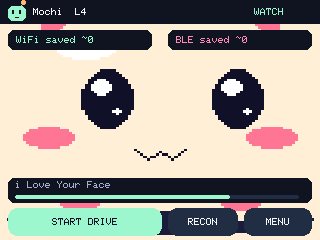 |
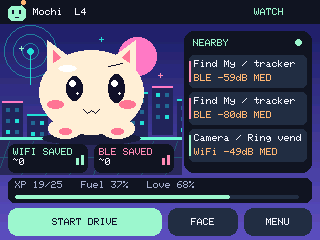
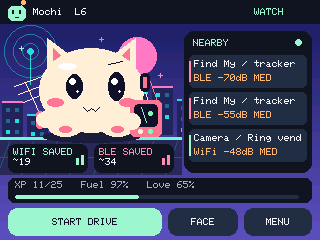
Tap FACE / RECON on the home screen. Recon keeps three recent clues beside the pet; tap a clue for evidence, confidence and age. Both views show approximate distinct Wi-Fi/BLE addresses saved during the current drive, not raw packets. ~ marks conservative Bloom-filter counting; BLE address rotation can represent the same physical device more than once. Background watch still detects clues but does not collect a drive or feed the pet.
Every 25 eligible Wi-Fi discoveries advances one level. XP continues across restarts. Saved discoveries get a quick happy bounce and pixel sparks; each level earns a confetti celebration. Alerts take visual priority. All buddies, eyes, colors and outfits are available immediately. Petting builds affection, and only wardriving earns food.
Display + Fun chooses Signal City, Sunset Run, Star Patrol or Pixel Garden. Separate switches control mood lights, tilt/gaze, head-swipe view switching, wave hello and automatic brightness. Optional NFC outfit cards recall a saved look from one of your own ISO14443A tags. The camera and microphone are unused. Hardware play guide.
Upload when you get home
Open Upload drives to preview a CSV, send it directly to WiGLE, or export a WiGLE 1.6 copy for WDGWars. Browser credentials remain in memory for that visit. WDGWars currently disallows the browser's cross-origin request, so its browser path is an export, not a pretend upload.
For the robot, enter your 2.4 GHz network and selected service API credentials, then Send setup over USB or download /dashchan/upload.json. On StackChan, Menu → Upload drives lets you choose a saved drive and confirm sending. Optional auto-send after Stop + Save starts off. HTTPS verifies certificates; accepted/uncertain receipts prevent blind automatic resubmission. Original CSVs remain on SD. The setup file contains readable credentials and must stay private. Setup, limits and recovery.
Meet your copilot
| Buddy | Personality |
|---|---|
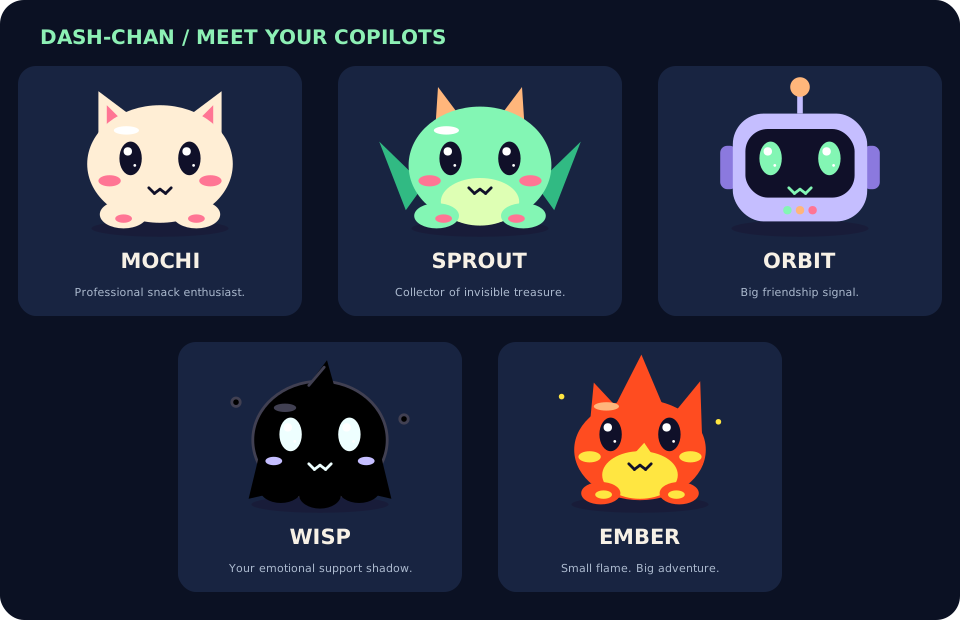
| Mochi | A curious cream cat with a serious snack habit. “My whiskers are on patrol.” |
| Sprout | A mint dragon building a tiny signal hoard. “My wings are in airplane-ish mode.” |
| Orbit | A lilac robot with excellent friendship reception. “My emotional support human is here.” |
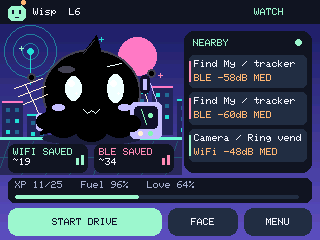
| Wisp | An all-black little ghost with bright eyes and drifting wisps. “Your emotional support shadow.” |
| Ember | A tiny orange flame with flickering tips and floating sparks. “Small flame. Big adventure.” |
| Your custom buddy | Mix six eye styles, three colors, headwear, glasses, and neckwear on any original shape. Name it and save it in Avatar Studio. |
| Wisp on the robot | Ember on the robot |
|---|---|
 |
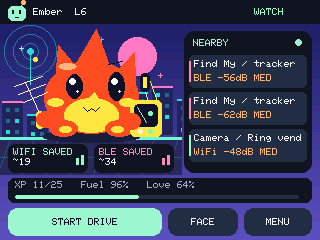 |
Curious brows, bright eye highlights, paw pads, heart reactions, and open-mouth cheers give the five buddies a little more character. Your pet stays visible on its home screen until you open a menu. Alerts use an expression, compact signal ribbon, and speech bubble. Idle gestures include glances, nods, curious looks, and quiet pauses. Petting gives heart eyes and affection; fuel and XP come from exploring.
Wardriving is the only way to feed Dash-Chan. Every five new Wi-Fi BSSIDs successfully written with valid GPS in the current session earn +12 fuel. Each earns one XP. BLE, background watch, petting, and demos never feed it. Per-drive approximate deduplication prevents repeat-food farming within a session; it may conservatively miss a discovery on a very large drive. Stopping and starting creates a new food session.
This is a scripted personality engine, not cloud AI. No account, microphone processing, or internet connection is needed on the robot.
Make a buddy that looks like yours
Open Avatar Studio and start with Wisp, Ember, Signal Scout, Neon Listener, Petal Patrol, or Mochi Royale. Mix six eye styles, six headwear choices, four eyewear choices, and four neckwear choices, including None. Change body, accent, and eye colors. Preview love, alert, discovery cheers, listening, and cruising poses in four arcade worlds; save a portrait or an avatar file. Your draft stays in your browser.
Send to StackChan applies the design over USB without reflashing. Install 0.4 or newer for all five shapes. Earlier DCAV1 avatar files still import. On the robot, MENU → Buddy + Look → Avatar Studio cycles styles without a computer. Full studio guide and profile format.
In Auto field-kit mode, the pet holds a radar-style antenna and pocket receiver while recording or when fresh GPS speed confirms movement. Always keeps the gear visible; Off hides it. Cruising adds a subtle bob and travel streaks. These are personality animations: the receiver does not process audio, and the antenna does not indicate signal direction. Alerts, muting, logging, and food rules work independently of the outfit.
Four themes, one familiar face
| Dark | Light |
|---|---|
 |
 |
| Matrix | BWM |
 |
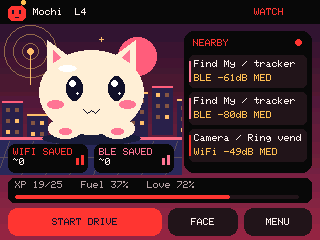 |
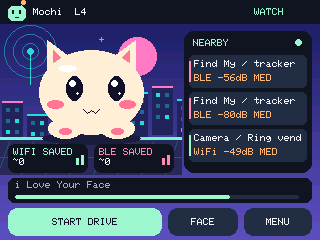
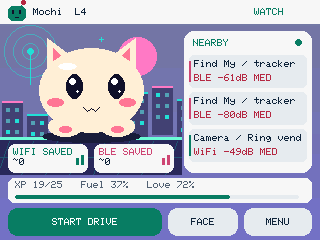
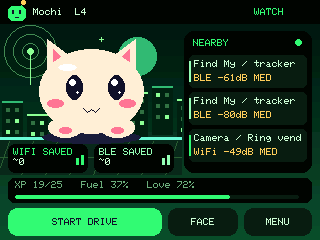
These are captures of the running firmware. The supplied BWM and VTS logos appear side by side at boot before the pet wakes up.
Two jobs, always together
Keep watch: passive Wi-Fi/BLE listening begins at boot and continues on every screen, whether or not a wardrive is recording. A configured upload temporarily pauses both radios, then restores watching. The classifiers examine supported body-camera, ALPR/camera-vendor, camera-glasses, tracker, gadget, and Remote ID signatures. A detection is a radio clue, not authenticated identity, proof of police presence, or proof that recording is happening.
Go exploring: tap START DRIVE on the face. A new SD file receives valid GPS-tagged Wi-Fi access points and BLE observations in WiGLE 1.4 CSV. Detection alerts still work during the drive. Tap STOP + SAVE to close it and continue background watching.
The radio now also examines client probes, selected management/action frames, and candidate transmitter/receiver address headers for detection. Those frames are not written as Wi-Fi access points. Watching does not connect, probe, pair, deauthenticate, jam, decrypt, or save Wi-Fi data payloads. Only the optional upload activity joins your configured Wi-Fi.
Personality at your volume
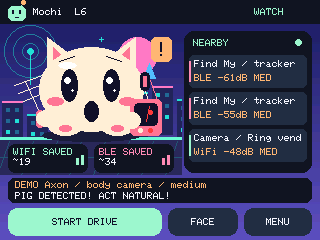
Spicy Axon reactions can display or speak “PIG DETECTED! ACT NATURAL!”, “Oh man, the fuzz!”, or use a siren with a panicked face and quick double-takes. Other families get captions such as “Biscuit nearby! Wait… not a snack?” and “Spicy fruit on the airwaves!” The Axon demo is synthetic and never becomes a real detection or WiGLE observation.
Speech defaults OFF. In MENU → Sound & Voice:
- Voice OFF disables every spoken clip while keeping configured electronic alert tones available.
- Master sound OFF immediately silences all audio. Preferences survive reboot and firmware updates.
- Alert tones: Personality, Siren, Arcade, Chime, Silent; selectable volume through 255.
- Deliberate screen petting can say “i Love Your Face” only when Voice is enabled, at most once per minute.
- Head-sensor petting gives visual affection without speech. Debounce and release-to-rearm prevent a held/noisy sensor from retriggering continuously.
Choose Off / Gentle / Lively head motion and Spicy / Gentle banter under Personality. Head movement starts off on a new installation, uses the BSP's factory zero positions, and stays within bounded travel. Looking around is animation, not RF direction finding.
Alerts that know when to be quiet
The same continuing encounter is announced once by default. Its recent entry continues updating RSSI, count, and last-seen time. After five minutes absent, it can announce again. Stronger evidence may alert again after cooldowns. A separate 60/180/300-second family quiet period reduces repeated notifications from rotating addresses; it does not claim those addresses belong to the same device. Optional five-minute reminders are off by default.
There are 128 encounter-ledger slots and 32 browsable recent entries. Very dense areas can evict older state. A default medium-or-higher confidence threshold keeps weak name/vendor clues quieter. Exact methods, limits, and personal watchlists.
Hardware and first use
- Official StackChan K151/CoreS3: ESP32-S3, 16 MB flash, 8 MB Quad PSRAM, 320 × 240 landscape display. Generic DIY Stack-chan servo wiring is unsupported.
- Native radio: 2.4 GHz Wi-Fi and BLE. No 5 GHz, Bluetooth Classic, LoRa, or sub-GHz reception.
- GPS: UART NMEA on blue Port C by default (host RX G18), with A/B/custom Grove RX options. GPS & SD → GPS SETUP has M5Stack and ATGM336H presets plus baud search. Stack/Atom/Cap receivers need adapters; bare ATGM modules need regulated 3.3 V power. Compatibility table and wiring.
- Storage: FAT32 microSD in the robot. No automatic formatting.
Use the web flasher in desktop Chrome/Edge. It can download a full factory backup, validates the chip and flash size, checks SHA-256 downloads, writes split images without whole-chip erase, verifies written flash, and checks that NVS calibration is unchanged. The same site provides the creator, real UI images, quickstart, downloads, and attributions. Detailed install/recovery instructions.
Controls
| Screen/control | Action |
|---|---|
| Face: START / STOP & SAVE | Open or close a wardrive |
| Face tap / top touch sensor | Affection; no food |
| Alert speech bubble | Dismiss reaction; continue listening |
| MENU → Buddy + Look | Five original buddies, custom buddy, four themes, Avatar Studio and field-kit preference |
| MENU → Sound & Voice | Master mute, voice switch, tones, volume, preview/demo |
| MENU → Personality | Motion, banter, pet |
| MENU → Detection | Confidence, family quiet period, optional reminders |
| MENU → Recent Signals | Paginated evidence and last-seen details |
| MENU → GPS & SD | GPS quality, rows/drops, error text, module presets, receive pins, baud finder, wiring help, SD retry |
Logs and GPS quality
/wardrives/dash-00000001.csv uses the standard 11-column WiGLE format. New Start presses create new files without overwriting earlier drives. /events/detections.csv records emitted alert events separately. Uploads are disabled until configured; automatic sending requires an explicit opt-in.
Rows require valid UTC, a fix no older than two seconds, at least four satellites, HDOP ≤ 5, finite in-range coordinates/altitude, and packet queue latency ≤ 250 ms. GPS loss pauses rows; the firmware never fills them with invented or stale positions. AccuracyMeters is the documented HDOP × 5 m estimate, not measured error. Repeat rows are rate-limited per address/transport to 30 seconds in a bounded contact cache.
Files flush every two seconds and at Stop. Use STOP + SAVE before power-off or card removal. Sudden power loss can still lose buffered writes or damage FAT metadata. A write failure stops recording and reports an error while background watch continues. Keep real logs private when sharing bug reports.
Build and contribute
python -m pip install platformio==6.2.0
pio run -e stackchan
python tools/test.py             # g++/gcc, CXX/CC, or ziglang==0.13.0
python tools/package.py          # release ZIP + site/firmware
node --test tests/web_test.mjs tests/studio_test.mjs   # Node 22+
python -m http.server 8765 --directory site
For browser checks: npm install, npx playwright install chromium, then node tests/browser_test.mjs while the local site server runs. Architecture, serial commands, and verification. GitHub Actions runs host tests, builds firmware, packages images, and tests the site. The Pages workflow publishes site/ with generated firmware.
Report your exact board, firmware version, GPS baud, SD format, reproduction steps, and redacted status output in Issues. Do not attach factory backups or unredacted wardrive files. Field testing with known emitting devices and real WiGLE uploads is welcome; neither is replaced by synthetic parser tests.
Credits and licensing
Built with gratitude to Dragon Detector, SquachWatch / skizzophrenic, Colonel Panic's Unified Blue / OUI Spy / Flock-You / AXEOFF, JustCallMeKoko's ESP32 Dual Band Wardriver / Marauder, Midwest Gadgets' Piglet, M5Stack, OpenDroneID, and Espressif. Pinned sources, precise reuse, and retained license notices.
Dash-Chan is GPL-3.0-or-later; imported components retain their own notices. Mochi, Sprout, and Orbit are original code-drawn avatars. SquachWatch inspired expressive timing and a companion-led experience; its mascot/artwork was not copied. Piglet is a behavioral reference, not bundled source. Unified Blue's reviewed snapshot has no explicit license, so its code is not vendored. BWM/VTS brand rights remain with their owners. No upstream endorsement is implied.